Custom Builder

Quick Guide

Use the navigation menu to work through the Custom Builder step by step.

Start with 1. Cabinet Type and follow the numbered navigation buttons in order. Each step guides you through the available options for your selected product, including material, profile, size, paint, hinges, edges and any product-specific settings.

You can click any previous navigation button at any time to review or change your selections. The available steps may change depending on the product you are configuring.

On a desktop computer, you can also use Page Down to move to the next available step and Page Up to return to the previous step. The Custom Builder will automatically skip any steps that are not required for your current product.

When you are ready to review your item, use Summary/Cart to jump to the summary and Add to Cart area. Use Items to view the products already added to your current project.


Cabinet Type v4.8.370

What cabinet system are you using?
Choose Custom Made for made-to-measure doors and panels.

Product Type

What product do you need?

Material

Select Painted and choose your material thickness here. Configure your paint colour, brand and finish in the next section, Paint Options.

Select Laminated (Polytec) and choose your material thickness here. Polytec finishes and colours are selected in the next section, with different options available for 16mm Decorative and 18mm Decorative materials.
Choose your material
Thickness
Thickness
Minimum order: A minimum order of $1,000 applies per paint colour.
Minimum order: A $60.50 service fee applies to orders under $1,000.
Important Preview: This renderer is for visual reference only. Hinge holes, when shown, are on the back while the preview is shown from the front. Rendered standard handles, when shown, indicate opening direction only and are not included.
Important Preview: When a Polytec full-sheet image is available, the renderer maps it proportionally using the standard 2400 × 1200 mm sheet as its scale reference. Where a full-sheet image is unavailable, the smaller colour image is used as a visual fallback and is not shown to scale. Actual sheet cutting position, pattern repeat and natural variation may still differ from the preview. Hinge holes, when shown, are on the back while the preview is shown from the front. Rendered standard handles, when shown, indicate opening direction only and are not included. View Polytec’s full-sheet colour images ↗

Paint Options

Paint Colour
Colour Match requires a physical sample to be supplied to Sydney Doors.
Paint Finish
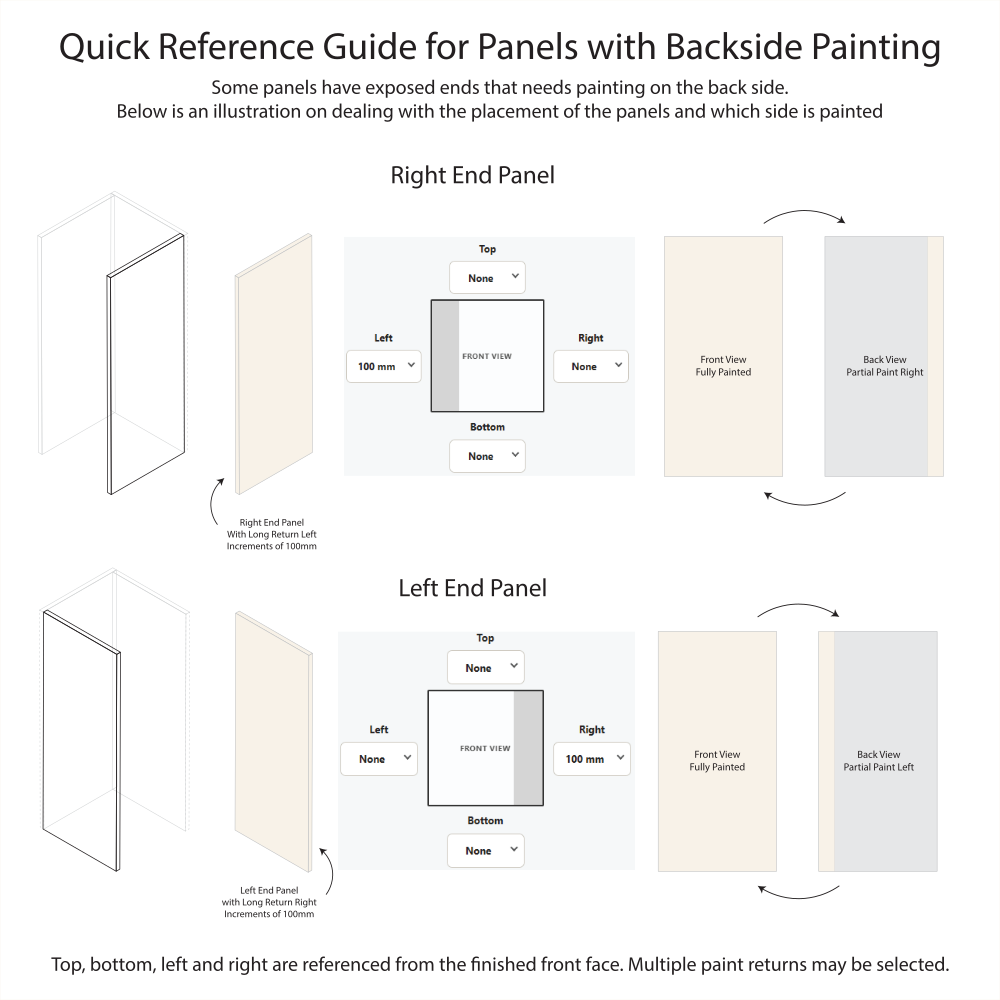
Backside Paint

Profiles

Select a Polytec finish, then choose from the colours available within that finish.
Glass Frame Type
Number of Windows
Frame Profile
Glass
Painted Profiles

Integrated Handles Designs (5)

Handle Position

Shaker Designs (11)

Note: 5010 SQ0 and 5020 SQ0 require a minimum 21mm Painted thickness (21mm or 25mm) and use a standard 3mm routing depth.

Retro Designs (7)

Traditional Designs (12)

Heritage Designs (7)

Colonial Designs (6)

16mm Decorative Finishes

Matt Colours (59)

Sheen Colours (12)

Smooth Colours (16)

Texture Colours (3)

Woodmatt Colours (31)

18mm Decorative Finishes

Createc Colours (9)

Legato Colours (14)

Ravine Colours (21)

Venette Colours (16)

Ultraglaze Colours (11)

Ultramatt Colours (11)

Woodmatt Colours (12)

Size

Note: Enter the finished door or panel size. Simple calculations can be entered directly into the size fields.

Hinge Options

Hinge Type
Hinge Pattern
Hinge Side
Placement
Hinges Per Door

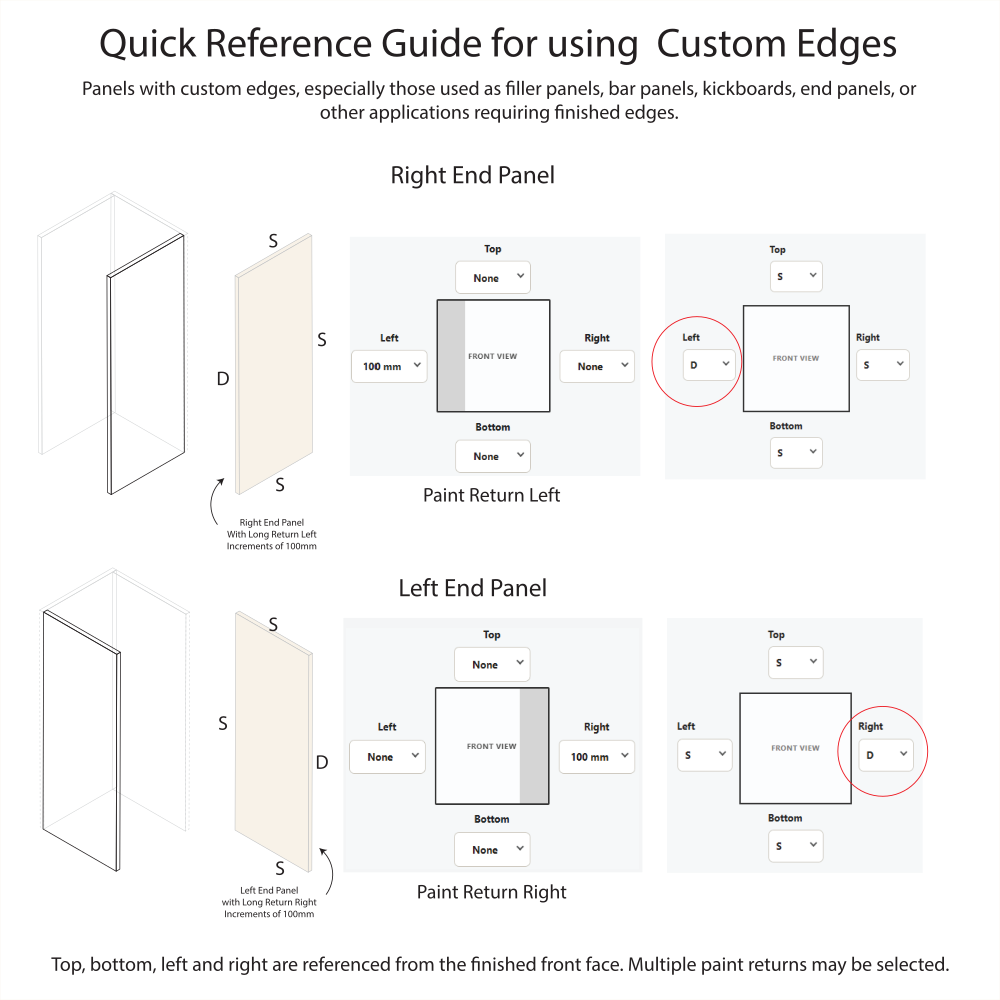
Edge Options *

Polytec Edges & Handles

Edge Type: Square Edge (Standard)
Handle
Handle Position

Notes / Special Instructions

Note: Use this field for special instructions or to identify the door or panel location, e.g. Upper Cupboard, Lower Cupboard, Pantry, Above Oven, Top Drawer, Bottom Drawer, etc.